FINTRAC Exchange Rates: Using Bank of Canada Rates for the $10,000 Threshold
Every Threshold Is a Canadian Dollar Threshold
FINTRAC's reporting thresholds are set in Canadian dollars. A US$7,500 wire, a €6,800 cash deposit or 7,400 USDC can each be over or under $10,000 CAD depending on the exchange rate you apply.
That makes the exchange rate part of your reporting logic, not a back-office detail. If the rate is wrong, the threshold test is wrong, and a reportable transaction can go unreported. This post covers what FINTRAC requires, where Bank of Canada data runs out, and how to handle currencies and stablecoins the Bank doesn't cover.
What FINTRAC Requires
FINTRAC's guidance on reporting electronic funds transfers sets out three steps:
FINTRAC EFT guidance: converting foreign currency
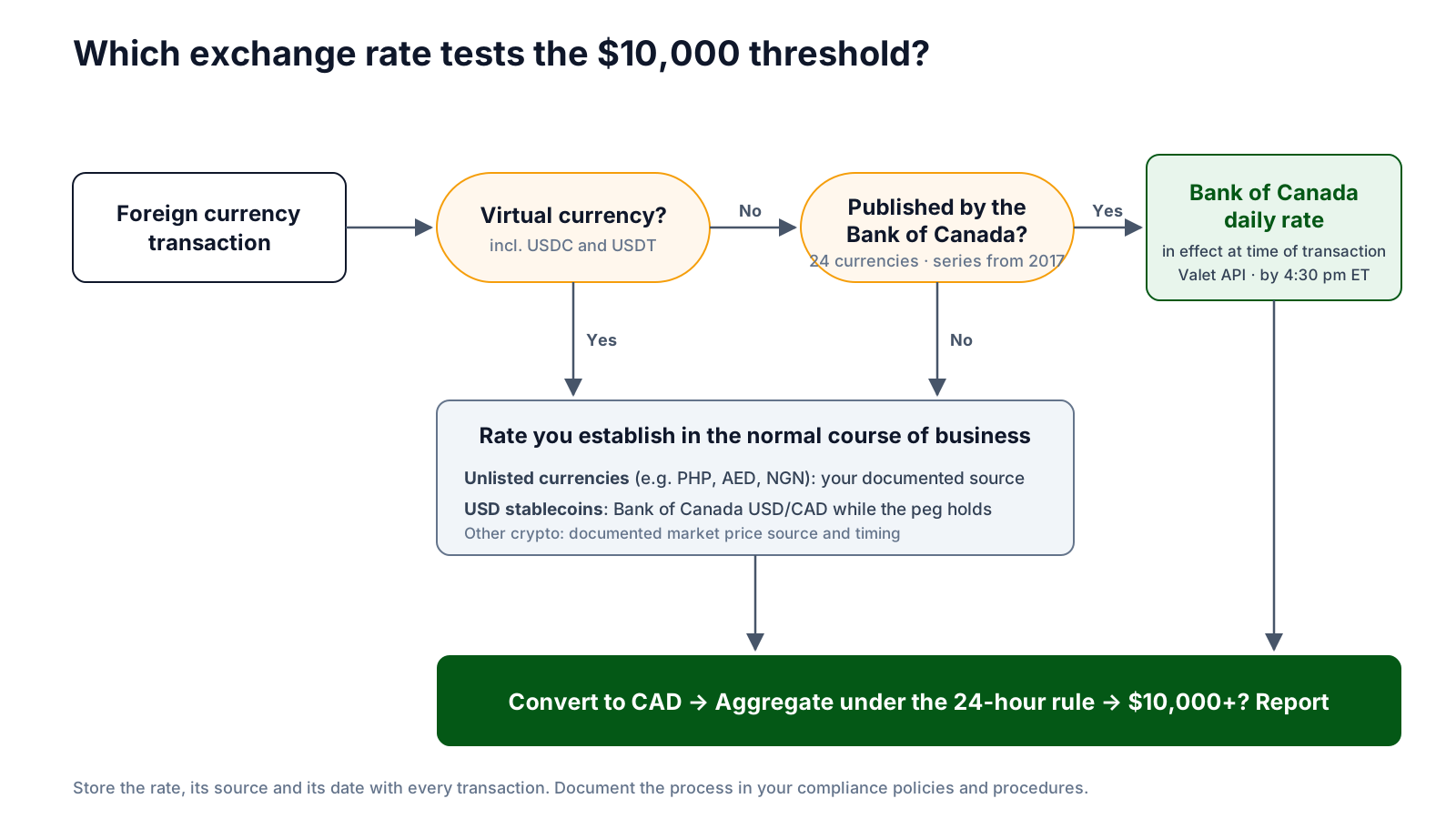
If you initiate or finally receive an electronic funds transfer in a foreign currency, convert the amount into Canadian dollars using the exchange rate published by the Bank of Canada in effect at the time of the transaction to determine whether you have reached the reporting threshold amount of $10,000 CAD.
If an exchange rate is not published by the Bank of Canada, then you must use the rate you establish in the normal course of your business at the time of the transaction.
Your process for establishing an exchange rate to determine if you have reached the reporting threshold amount should be outlined in your compliance policies and procedures.
The same approach applies to large cash transactions. Virtual currency is different. The Bank of Canada doesn't publish crypto rates, so FINTRAC's LVCTR guidance says to use the rate you establish in the normal course of business, and to document how you select exchange rates and their source.
| Transaction | Rate to use for the threshold test |
|---|---|
| Cash or EFT in one of the 24 Bank of Canada currencies | Bank of Canada daily rate in effect at the time of the transaction |
| Cash or EFT in any other currency | Rate you establish in the normal course of business |
| Virtual currency, including stablecoins | Rate you establish in the normal course of business |
Remember that the conversion feeds into the 24-hour rule. Convert each transaction first, then aggregate the Canadian dollar amounts.
Using Bank of Canada Data
The Bank of Canada publishes daily exchange rates once each business day by 4:30 pm ET. Each rate is an indicative average of quotes from financial institutions, expressed as one unit of foreign currency in Canadian dollars. The data is free and available through the Bank's Valet API in JSON, CSV and XML.
Getting the rates is not the hard part. Pulling them once a day is a simple scheduled job that requests the latest observation for each series (for example FXUSDCAD) and stores it with its publication date. You can then validate every foreign currency transaction against the stored rate before running threshold checks.
The harder part is deciding which rate was "in effect at the time of the transaction." A wire sent at 10:00 am on Tuesday happens before Tuesday's rate is published. Most teams use the most recently published rate, which in that case is Monday's. Weekends and statutory holidays have no new rate, so the last published rate carries forward. Whichever convention you choose, write it down and apply it consistently.
Where Bank of Canada Data Runs Out
Bank of Canada rates cover the most common cases, but there are three gaps compliance teams run into.
Only 24 currencies
The daily series covers 24 currencies, including USD, EUR, GBP, JPY, CNY, INR, MXN and CHF. Remittance corridors often involve currencies it doesn't cover, such as the Philippine peso, UAE dirham, Nigerian naira or Pakistani rupee. For these you need your own documented rate.
The current series starts in 2017
The current daily series begins on January 3, 2017. Earlier data sits in the Bank's separate historical noon and closing rate series, which works differently. That matters for lookbacks and corrections that reach back before 2017.
One indicative rate a day
You get one rate per business day, not intraday prices. During sharp currency moves, the published rate can differ from the rate you actually gave your client.
No virtual currency
The Bank publishes no rates for crypto assets, including stablecoins. Every virtual currency conversion depends on a rate source you choose and document.
Bank of Canada Rates vs. Your Internal Rates
Most money services businesses, payment providers and dealers already have their own exchange rates: the rate quoted to the client, a treasury rate or a provider feed. That raises a practical question: if you already have a rate, why use a different one for reporting?
Because FINTRAC asks for the Bank of Canada rate whenever one is published, the rate you charge and the rate you test the threshold with can be different numbers. A business that uses its internal rate for everything can reach a different threshold answer than one that follows the guidance. Near $10,000, that difference decides whether a report is filed.
Common problems teams run into:
- The client-facing rate is used for threshold testing even though a Bank of Canada rate exists for that currency.
- The rate isn't stored with the transaction, so nobody can show later which rate was applied or when.
- Exchange rates are entered manually, so typos and stale rates slip through.
- Different systems use different sources, so cash, wires and crypto give inconsistent results for the same client.
A simple control fixes most of this: store the Bank of Canada rate daily, and flag any transaction where the converted amount falls near the threshold under either rate, or where the internal rate differs from the Bank of Canada rate by more than a set tolerance.
A Policy Statement Is Not a Process
Most smaller MSBs already have a line in their compliance policy saying they will use the Bank of Canada exchange rate. Far fewer have a process behind it. Nobody pulls the rate each day, nobody records which rate was applied to a transaction, and nothing in the workflow checks the conversion before the threshold test.
FINTRAC doesn't ask for a perfect system. It asks you to document your approach to establishing exchange rates and then follow it. For a small MSB, that can be as simple as:
- Naming the source: Bank of Canada daily rates, plus a fallback for currencies the Bank doesn't publish.
- Saying who gets the rate, when, and where it's recorded.
- Saying which rate applies to a transaction, including before 4:30 pm ET, on weekends and on holidays.
- Keeping the rate with each transaction record so you can show it during an examination.
The gap between the policy and the practice is what an examiner will notice. A policy that says "Bank of Canada rate" while staff actually use the till rate is a finding, even if no report was missed.
A practitioner's view: burden vs. value
For many small MSBs, a separate Bank of Canada rate is mostly an operational burden. They already quote a rate to every client, and keeping a second rate just for threshold testing creates another number to track, reconcile and explain. Without clear guidance from FINTRAC on what the Bank of Canada rate adds over a well-documented internal rate, the requirement can cause more confusion than it prevents. Until that guidance exists, the practical answer is the same: document your approach, apply it consistently, and keep the evidence.
Stablecoins: USDC and USDT
For many virtual currency businesses, a large share of volume is in USD stablecoins such as USDC and USDT. Both are designed to hold a 1:1 peg to the US dollar, so a common approach is to convert them using the Bank of Canada USD/CAD rate.
This is a reasonable choice, but under FINTRAC's guidance it is still a rate you establish in the normal course of business, because the Bank of Canada doesn't publish stablecoin rates. To make it defensible:
- Document it. State in your policies and procedures that USD-pegged stablecoins are converted at the Bank of Canada USD/CAD rate, and list which tokens this covers.
- Watch the peg. Pegs can break. USDC briefly fell well below $1 in March 2023. Set a tolerance, for example 1%, and switch to a market price from your documented crypto price source if a token trades outside it.
- Treat other crypto separately. Bitcoin, Ether and non-USD stablecoins need a documented market price source and timing rule.
- Be consistent. Use the same convention for threshold testing, aggregation and the amounts you report.
What to Put in Your Policies and Procedures
FINTRAC expects your exchange rate process to be written down. At a minimum, cover:
- Source: Bank of Canada daily rates for listed currencies, plus your named source for everything else.
- Timing: which published rate counts as "in effect" for a transaction, including intraday, weekend and holiday transactions.
- Unlisted currencies: how you set the normal-course rate and who approves the source.
- Virtual currency: price source, timing and your stablecoin peg convention with its tolerance.
- Record keeping: store the rate, its source and its date with each transaction.
- Controls: daily rate pulls, alerts if a pull fails, and checks for missing or stale rates.
- Evidence it happens: a policy line on its own isn't enough. Keep the daily rate log and the rate on each transaction so you can show the process works.
The Bottom Line
The rule is simple: use the Bank of Canada rate when one exists, use your own documented rate when it doesn't, and write down how you do both. The risk is in the details: currencies the Bank doesn't cover, data before 2017, the timing of a once-a-day rate, and stablecoins that are pegged until they aren't. Automate the daily pull, store the rate with every transaction, and you'll have a clear answer when an examiner asks why a transaction was or wasn't reported.
Exchange Rates Built Into Your Reporting
Quantoflow pulls Bank of Canada rates daily, applies your documented rates for other currencies and virtual currency, and validates every conversion before testing thresholds and aggregating under the 24-hour rule.
Talk to the Quantoflow TeamCitations
- FINTRAC: Reporting electronic funds transfers to FINTRAC https://fintrac-canafe.canada.ca/guidance-directives/transaction-operation/eft-dt/eft-dt-eng
- FINTRAC: Reporting large virtual currency transactions to FINTRAC https://fintrac-canafe.canada.ca/guidance-directives/transaction-operation/lvctr/lvctr-eng
- Bank of Canada: Daily exchange rates https://www.bankofcanada.ca/rates/exchange/daily-exchange-rates/
- Bank of Canada: Valet API https://www.bankofcanada.ca/valet/docs