The FINTRAC 24-Hour Rule: Static Windows vs. Running Clocks
Why 24 Hours Is Harder Than It Sounds
Few FINTRAC rules look simpler than the 24-hour rule. If a client brings in $6,000 cash in the morning and $5,000 in the afternoon, you treat it as one $11,000 transaction and file a Large Cash Transaction Report (LCTR). Most teams know that much.
The hard part is deciding where the 24 hours start and stop. FINTRAC's guidance describes a static window, such as midnight to midnight. Some compliance teams and examiners read the regulation as a running clock that starts with the first transaction. Both approaches can be defended, but they give different answers in exactly the cases that matter most: transactions spread out to avoid the threshold.
This post covers what the law says, what FINTRAC's guidance adds, where the two interpretations split, and how to pick a method an examiner will accept.
What the Law Actually Says
The 24-hour rule is set out in the Proceeds of Crime (Money Laundering) and Terrorist Financing Regulations (PCMLTFR), sections 126 to 130. Section 126 covers cash:
PCMLTFR s.126: Large cash transactions
If a person or entity that is required under these Regulations to report the receipt from a person or entity of an amount in cash or to keep a large cash transaction record receives amounts in cash that total $10,000 or more in two or more transactions that are made within 24 consecutive hours, those transactions are deemed to be a single transaction of $10,000 or more if that person or entity knows that
(a) the transactions are conducted by the same person or entity;
(b) the transactions are conducted on behalf of the same person or entity; or
(c) the amounts are for the same beneficiary.
The remaining sections apply the same logic to other report types:
| Section | Applies to | Report |
|---|---|---|
| s.126 | Cash received | LCTR |
| ss.127–128 | Electronic funds transfers (incoming and outgoing international) | EFTR |
| s.129 | Virtual currency received | LVCTR |
| s.130 | Casino disbursements | CDR |
Three details in the wording matter:
- "24 consecutive hours." The regulation does not say "calendar day" or "business day," and it does not say when the 24 hours begin.
- "Knows." Aggregation applies when you, an employee or a senior officer knows the transactions share a conductor, a third party or a beneficiary. If your records and systems can link them, an examiner will expect you to know.
- Three aggregation types. Same conductor, same third party (on whose behalf) and same beneficiary are assessed separately. One set of transactions can aggregate one way and not another.
What FINTRAC's Guidance Adds
FINTRAC's guidance, Reporting transactions to FINTRAC: The 24-hour rule, describes a static 24-hour window: a fixed period such as 9:00 am Monday to 8:59 am Tuesday. The main points:
- The 24 hours must be consecutive, and a window cannot be longer than 24 hours. A Friday-to-Monday weekend is not one window.
- You can use different static windows for different business lines or transaction types, for example midnight to midnight for wires and 8:00 pm to 7:59 pm for cash.
- A single transaction cannot fall into more than one window.
- Your compliance policies and procedures should state when each window starts and ends, and the start and end times go into the report itself.
Static windows are popular because they are easy to run. A nightly batch job groups the day's transactions, totals them per client and flags anything at $10,000 or more.
Two Interpretations: Static Window vs. Running Clock
The regulation's text supports a second reading. Under a running clock, also called a rolling window, the 24 hours start at the first transaction. Every new transaction then opens a window that looks back (or forward) 24 hours.
| Static window | Running clock (rolling) | |
|---|---|---|
| When the 24 hours start | Fixed time you choose (e.g. 00:00) | At each client's first transaction |
| Described in FINTRAC guidance | Yes, with examples | Not in the current 24-hour rule guidance |
| Matches "24 consecutive hours" | Yes, but only within your fixed boundaries | Yes, for any 24-hour span |
| Gaps around the boundary | Transactions minutes apart can split across two windows | No fixed boundary to exploit |
| Operational effort | Low: one batch per window | Higher: continuous or look-back aggregation |
| Can be gamed | Yes, once someone learns the cut-off time | Much harder |
FINTRAC's own worked example shows the difference. A client makes three $5,500 cash deposits:
| Deposit | Time | Static window (8:00 am to 7:59 am) | Running clock |
|---|---|---|---|
| 1 | Monday 8:00 am | LCTR 1 | LCTR 1 |
| 2 | Monday 4:00 pm | LCTR 1 | LCTR 1 and LCTR 2 |
| 3 | Tuesday 10:00 am | New window, $5,500 only | LCTR 2 |
Deposits 2 and 3 are 18 hours apart and total $11,000. A static window never reports that pair. A running clock does.
The Two-Minute Gap
The gap gets starker at the boundary. Take a business on a midnight-to-midnight window. A client deposits $5,000 at 11:59 pm Monday and $5,500 at 12:01 am Tuesday.
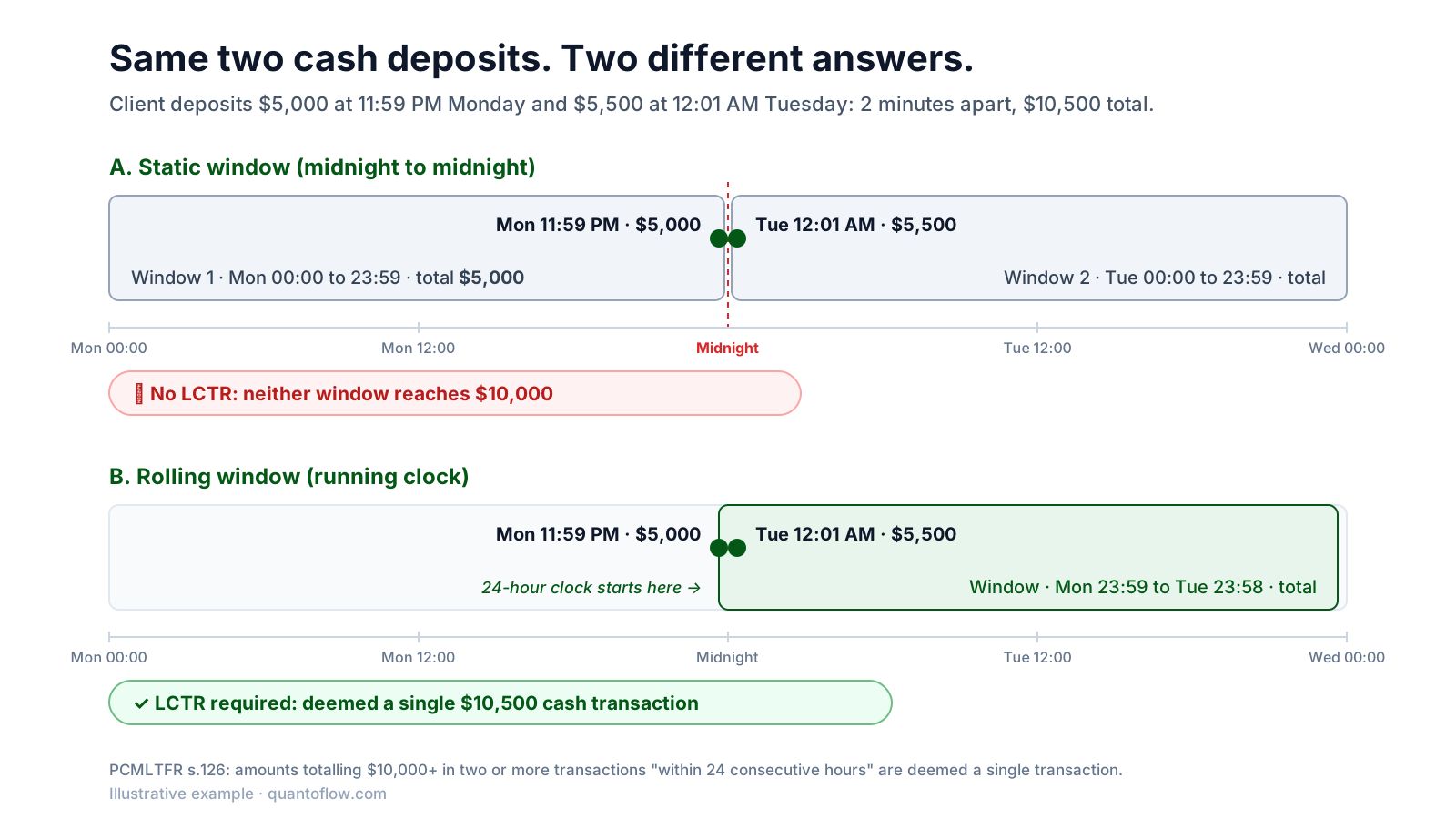
Under the static window, each deposit sits alone in its own day and neither day reaches $10,000, so no report is filed. Under a running clock, $10,500 arrived within 24 consecutive hours, and that is a single reportable transaction under s.126.
This is not hypothetical. Examiners regularly find transactions just inside 24 hours of each other that were never aggregated because they straddled a window boundary. Once a client or an employee learns where the cut-off falls, the boundary becomes a structuring tool.
How an Examiner May Assess It
The key point is that FINTRAC guidance is guidance, not law. The static window examples explain one way to comply. They do not change what the regulation says, and the regulation says "24 consecutive hours."
An examiner's view of the two-minute scenario
After first confirming the transactions weren't reported some other way, an examiner could assess the two-minute scenario above as an unreported LCTR. Because amounts split around a cut-off are a classic structuring indicator, it could also become an unreported STR. Pointing to the static window example in the guidance may not be enough of a defence.
From that perspective, the regulation doesn't really require you to specify a 24-hour window at all. What it requires is a method that actually captures transactions made within 24 consecutive hours, and that clients or staff can't manipulate. This is also why many practitioners would like FINTRAC to add a running clock example to its guidance alongside the static ones: a 24-hour clock that starts at the first transaction.
Interpretations vary between examiners and over time, and this is not legal advice. The practical takeaway still holds: a static window you can defend on paper can still leave a gap an examiner will find in your data.
Choosing a Method for Your Business
Pick the method that best captures the 24-hour period for your business, and be ready to explain why. A few options, from least to most protective:
Static window only
Simple and described in the guidance. It is acceptable when cash volumes are low and transactions rarely fall near the cut-off, but it leaves a boundary gap. Choose a cut-off when your business is closed (for example, 4:00 am for a business that closes at midnight).
Static window + boundary review
Keep the static window for reporting, but add a daily review of each client's transactions in the hours on either side of the cut-off. Escalate any pair that reaches $10,000 within 24 hours for LCTR and STR review.
Running clock
Aggregate every new transaction against the client's previous 24 hours. This closes the boundary gap and matches the regulation most literally. It needs transaction-level timestamps and continuous or frequent aggregation.
Structuring detection on top
Whatever window you use, run separate monitoring for amounts kept just under $10,000 across 24 to 72 hours. Structuring is an STR question even when no LCTR threshold is crossed.
Whichever you choose, document it:
- Write down the window for each business line and transaction type in your compliance policies and procedures, including start and end times and the time zone you report in.
- Explain why it fits your business: hours of operation, channels and transaction volumes.
- Aggregate each type separately: conductor, third party and beneficiary can each have their own window.
- Store full timestamps for every transaction, not just the date. You can't run a rolling look-back, or prove to an examiner that you didn't need one, without them.
- Test it. In your two-year effectiveness review, sample client activity near your window boundaries and confirm nothing reportable slipped through.
The Bottom Line
The 24-hour rule exists to stop people from splitting transactions to avoid reporting. A static window follows FINTRAC's examples, but it creates a fixed boundary that can be gamed. A running clock follows the regulation's wording more closely and leaves no boundary to game. Whichever you choose, the test an examiner applies is whether your method actually caught the transactions made within 24 consecutive hours.
Aggregate Without the Spreadsheets
Quantoflow aggregates cash, EFT and virtual currency transactions by conductor, third party and beneficiary, flags activity near your window boundaries for review, and files LCTRs, EFTRs and LVCTRs with a full audit trail.
Talk to the Quantoflow TeamCitations
- FINTRAC: Reporting transactions to FINTRAC: The 24-hour rule https://fintrac-canafe.canada.ca/guidance-directives/transaction-operation/24hour/1-eng
- FINTRAC: Reporting large cash transactions to FINTRAC https://fintrac-canafe.canada.ca/guidance-directives/transaction-operation/lctr-doie/lctr-doie-eng
- Proceeds of Crime (Money Laundering) and Terrorist Financing Regulations, SOR/2002-184, ss. 126–130 https://laws-lois.justice.gc.ca/eng/regulations/SOR-2002-184/